To send birthday invitations online and track RSVPs, choose a platform that sends the invitation and collects the replies, pick a design, add the party details, import your guest list, and send by email or text message with a reply-by date attached. The same six steps work for a kids party, an adult dinner, and a milestone celebration.
Greenvelope is the platform this guide recommends when the designed card and the headcount both matter to you: designer birthday party invitations delivered by email, text message, or a shareable link from one guest list, RSVP tracking that records each invited person’s response, custom questions for planning details such as allergies and meal choices, and an ad-free guest view where nobody needs an account or an app to reply. Single mailings start at $19 for a guest list of up to 20 people, with no subscription required. Greenvelope holds a 4.9-star Trustpilot rating across more than 10,000 reviews.
At a Glance
Pick where to send from, choose a design, add the details, import the guest list, set the RSVP questions and deadline, then send by email or text and follow up with guests who have not replied.
- Email and text message work from the same guest list, so each guest gets the channel they actually read.
- The RSVP travels with the invitation, so replies land in one tracked list instead of a message thread.
- For kids parties, the text goes to a parent or guardian, invited children are entered on the guest list by name, and the reply form asks the parent the planning questions.
- You can send or schedule RSVP reminder emails; for guests with only a phone number, send a follow-up text through paid-account messaging or personally.
What to Have Ready
A few minutes of preparation makes the send itself quick:
- The date, start time, and location, plus an end time for kids parties so pickup is clear.
- A guest list with an email address or mobile number for each guest, in a spreadsheet or your contacts.
- A reply-by date, often about a week before the party, or earlier if a venue or caterer needs a final count sooner.
- The names of everyone invited, including household members, and whether each invitation allows additional guests.
- The planning questions you need answered: allergies, meal choices, anything the venue asks for.
- A photo of the birthday person, if the design calls for one.
How to Send Birthday Invitations Online, Step by Step
- Choose where to send from. The core decision is whether you want a tool that produces artwork or a platform that sends the invitation and tracks the replies. A downloaded design file leaves the delivery and the reply-chasing to you, though some design apps add RSVP routes of their own; an invitation platform carries the card, the delivery, and the replies together. Our comparison of the best birthday invitation platforms matches each option to the kind of party, and the profiles below cover the short list.
- Pick a birthday design. On Greenvelope, browse designer templates by age and style or upload your own artwork for a fully custom card. Kids designs, casual adult parties, and formal milestone dinners each read differently, and for the big years the wording matters as much as the art; our milestone birthday invitation wording guide covers Sweet 16 through the 100th.
- Personalize the wording and party details. Cover who the party is for, the date and time, the place, and how to reply. Our birthday invitation wording guide has copy-ready examples for every age, and on a Greenvelope invitation the extras, maps, parking, gift notes, sit behind the card so the design stays clean.
- Build the guest list and choose email or text for each guest. Import guests from a spreadsheet or your contacts rather than typing names. Then route each guest to the channel they actually read: grandparents who never check email get a text, coworkers get email, and both reply into the same list. The full channel logic is in text vs. email invitations.
- Set the RSVP questions and deadline. A reply-by date about a week before the party is a practical starting point; move it earlier when a venue or caterer needs the final count sooner. The headcount comes from guests confirmed as attending, including any additional guests recorded in their RSVPs. The Plus 1 Policy sets how many additional guests each contact may bring; the allowance itself is not an attendance count. Custom questions collect planning details, meal choices for a dinner, allergies and pickup notes for a kids party, and an answer that mentions another person does not add that attendee. Our guide to adding custom questions to an online RSVP covers the formats.
- Send, track replies, and remind. Send yourself a test first and open it on a phone, since that is where most guests will see it. Then send and watch delivery and opens per guest. You can send or schedule RSVP reminder emails for guests who have not replied; they do not go out automatically because a deadline was entered, and event reminders are a separate send to guests marked attending. For guests with only a phone number, send a follow-up text through paid-account messaging or personally, covered in the texting section below. The reply mechanics in depth are in our online RSVP guide, and our RSVP reminder texts guide has copy-ready lines.
Where to Send Birthday Invitations From
Six options cover almost every birthday party. The differences that matter are what the guest receives, where the replies land, and what you pay.
Greenvelope
Greenvelope treats the birthday invitation as one job: the designed card, the delivery by email and text message from a single guest list, and the RSVP tracking all live in one place. Guests tap a link that opens the designed invitation, reply on its RSVP page without creating an account or downloading an app, and see no advertising around the card. Each invited person’s response is recorded by name, additional guests are governed by the plus-one allowance the host configures, and custom questions collect planning details such as allergies and meal choices. Mailings are priced by guest count, with no subscription required. Greenvelope does not print or mail paper invitations; it offers a high-quality version of the design you can save and print yourself or at a local print shop.
Evite
Evite is the invitation most guests have already received, and for a casual party where familiarity matters it does the basics quickly. Its no-cost tier is ad-supported, so guests open your invitation alongside advertising; Greenvelope charges per mailing and keeps the guest view ad-free.
Punchbowl
Punchbowl covers kids parties with a themed catalog many parents recognize. It runs on a paid membership that renews each billing period unless canceled, and its Premium tier includes multiple-choice polls that collect details such as dietary restrictions after guests RSVP. Greenvelope offers single-mailing pricing and asks its custom questions on the reply form itself.
Partiful
Partiful offers free, ad-free invitations with real-time RSVP tracking, text blasts, and guest polls. Its event pages are built to share as a link, a natural fit for a casual adult gathering organized in a group chat. Greenvelope focuses on the designed card: designer invitations delivered individually by email or text from one guest list, with custom questions on the reply form.
Greetings Island
Greetings Island offers no-cost birthday templates two ways. You can download the card and handle the sending and replies yourself, or send it as an online invitation with a free RSVP page that tracks responses, asks custom questions, and reminds guests who have not replied. Greenvelope’s difference is the invitation experience itself: a designer catalog and animated envelope with per-guest email and text delivery from one list.
Canva and other design apps
Canva and design apps such as Adobe Express are built for designing the card yourself, and the file they export does not collect RSVPs on its own. From there the routes differ: Adobe Express can publish an invitation as an event with email invites and RSVP management, Canva connects to Partiful through its Partiful Invites integration, and a finished file from either can be uploaded to Greenvelope, which sends it by email or text with RSVP tracking built in.
| Platform | Useful for | How it compares to Greenvelope |
|---|
| Greenvelope | Designed birthday invitations by email and text | One guest list across both channels, custom questions on the reply form, priced per mailing by guest count |
| Evite | Casual parties at scale | Familiar and quick; its no-cost tier shows guests advertising, where Greenvelope keeps the guest view ad-free |
| Punchbowl | Themed kids invitations | Membership renews unless canceled, with polls a Premium feature; Greenvelope offers single-mailing pricing |
| Partiful | Free, ad-free event pages with RSVP tracking | Built around a shared link and text blasts; Greenvelope delivers a designed card individually by email or text |
| Greetings Island | No-cost templates, downloadable or sent with a free online RSVP page | Its online sends track replies with custom questions and reminders; Greenvelope adds per-guest email and text delivery and the designer envelope experience |
| Canva and design apps | Designing the artwork yourself | A downloaded file carries no RSVP; Adobe Express adds events with RSVP management, Canva connects to Partiful, or upload the file to Greenvelope for email and text delivery with tracked RSVPs |
How to Send Birthday Invitations by Text
To send birthday invitations by text on Greenvelope, save a mobile number in the phone field of the guest’s contact entry and complete the send from your mailing list: the guest receives a text message containing a link that opens the designed invitation and its RSVP page, and the reply is tracked against their name in the same list as replies from email. Text delivery works for supported numbers in supported countries. Here is that sequence run once, end to end.
A Worked Example: Riley’s 30th, From the Text to the RSVP List
The host, guests, and party details in this example are invented. The design is a real Greenvelope design, and the sending steps and reply form follow Greenvelope’s help documentation.
The invitation. Riley is hosting a 30th birthday cookout on Saturday, October 24, 2026, from 3 to 6 p.m. at 24 Cedar Lane, with replies due October 17. Riley picks Grill & Gather by Anna K Design, a cookout invitation with lively grill, burger, and watermelon illustrations on a creme background, and fills in the wording:
Riley is turning 30. Burgers on the grill, cake in the garden.
Saturday, October 24, 2026, 3 to 6 p.m.
24 Cedar Lane. Park on the street and come around the back.
Reply by October 17 so we know how many burgers to buy.
 Grill & Gather by Anna K Design, the design this example uses, shown before Riley’s wording is added
On the invitation’s RSVP page Riley sets October 17 as the reply-by date and adds one write-in question: “Any dietary needs we should plan the grill around?”
The text message. Avery has no email address on file, so Riley enters Avery’s mobile number in the phone field of the contact entry and saves it. Because the contact has no email, the invitation goes out by text automatically when Riley completes the send from the mailing list, and the platform writes the delivery message, so there is nothing to compose. A guest with both an email address and a supported number is sent by email unless the host switches that guest to text, and if the Send button does not appear beside a contact, the number likely does not support text messaging through Greenvelope.
Riley could instead share the invitation personally. Every guest has a personalized invitation link that opens that guest’s own card, the same per-guest link behind the WhatsApp and Facebook sending options; copying it requires a paid account and is not available in Trial Mode, and Greenvelope does not track delivery of a message sent through another app. On that route Riley writes the message:
Hi Avery, it’s Riley. I’m turning 30 and grilling in the back garden on Saturday, October 24. Your invitation is here: [Avery’s invitation link]. Open it and RSVP by October 17.
Illustrative wording for the message Riley writes; the bracketed placeholder stands for Avery’s own invitation link.
What the guest does. Avery Patel taps the link in the text message, and the invitation opens as an animated envelope before the card itself. To reply, Avery chooses between the two reply buttons, which read Will Attend and Will Not Attend unless the host renames them, and choosing one brings up the questions Riley added. Avery picks Will Attend, types Vegetarian into the dietary question, and submits the RSVP on the invitation’s response page.
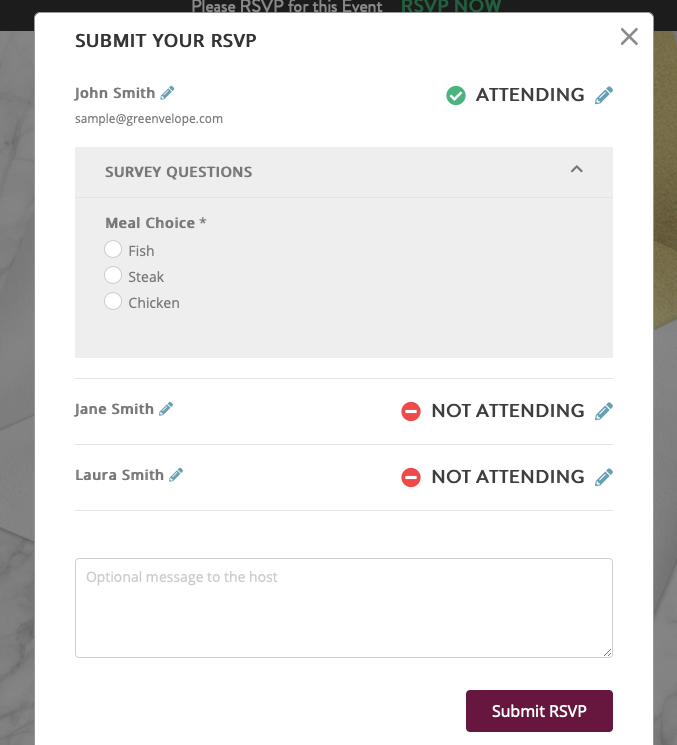 The reply form guests submit, shown with Greenvelope’s demo data. The person completing the RSVP records a separate attendance response for each named guest, the host’s questions appear under Survey Questions, and guests can leave a note for the host. This demo asks a fixed meal choice; Riley’s party asks one write-in dietary question instead.
Texting “YES” back does not automatically update the RSVP list. Ask the guest to submit their response through the invitation, or record their answer yourself.
What the host sees. As replies come in, each one appears beside the guest’s name with the dietary answer attached.
Illustrative example, not a product screenshot: four of Riley’s guests a few days after the send, with invented names and replies.
| Guest | Reply | Dietary answer |
|---|
| Avery Patel | Will attend | Vegetarian |
| Dana Whitfield | Will attend | No answer provided |
| Marcus Webb | Will not attend | No answer provided |
| Noor Haddad | Opened, no reply | No reply yet |
That is the result the party planning needs: Avery and Dana are attending, Avery needs a vegetarian option at the grill, Marcus has declined, and Noor is the one to follow up with before October 17. Dana’s missing dietary answer is not confirmation that Dana has no dietary needs; Riley asks when confirming the numbers. The RSVP reminders Greenvelope documents are emails, so if Noor has only a phone number on file, Riley sends a follow-up text instead, through paid-account messaging or personally, asking her to submit the RSVP through her invitation.
One note on volume: every paid account starts with 500 text messages for the account as a whole, not per mailing, and additional messages can be purchased for a fee, as the texting help article explains. How the field compares on true text delivery is in our roundup of the best text message invitation platforms, and the message wording itself is covered in text invitation wording.
Kids Birthday Invitation Text With a Parent RSVP
For a kids party, send the invitation to a parent or guardian’s contact information while keeping every invited attendee identifiable on the guest list. The person reading the text is not necessarily someone attending, and nobody is counted as attending solely because the link reached them. Set up the guest list so the list itself says who is invited:
| Party setup | Send the text to | Enter on the guest list |
|---|
| Drop-off party, child only | The parent or guardian | The invited child by name, with the parent’s phone or email as the contact details |
| Child with a parent staying | The parent | The child and the attending parent, linked as one household |
| Specified siblings invited | One parent | Each invited child by name, in one household contact |
When several named members of one household are invited, link them with Greenvelope’s Couple or Family contacts: the household shares one invitation link, and the person completing the RSVP records a separate response for each named member. The path is Send > Add Contacts > New Contact > Couple or Family; choose the group size, then enter each member’s name. Contact information is optional for the additional household members, and if you enter it, that member receives the card as well. Siblings who are actually invited belong on the list by name this way. A general additional-guest allowance is a different setting: the Plus 1 Policy controls how many extra guests each contact may bring and what information to collect about them, and it is not the tool for linking family members.
Use the RSVP questions for planning details rather than attendance math: a dropdown for adults versus children where that distinction matters, a dietary question so the answer attaches to the person it concerns, and a write-in pickup note for a drop-off event. A sibling count written into an answer is something to review, not proof that extra named attendees have been added or invited; if a reply mentions a sibling you meant to include, add that child to the household contact so their response is recorded.
The two totals a kids party needs stay a host tally. A hypothetical: ten children and six of their parents are entered by name as household members, and the replies come back with eight children and four of those parents marked as attending. That is eight places at the activity table and twelve people in the house, both counted from the named affirmative replies, since the RSVP list records each person’s response rather than producing separate child and adult totals for you.
Before sending, open a test on your phone and check that every invited child appears by name, the additional-guest allowance matches what you intend, and the reply form records each person individually. Our comparison of the best kids birthday invitation platforms covers how seven services handle parent RSVPs, and our guide to collecting RSVPs for a birthday party online covers the deeper setup.
When to Send Birthday Invitations
Send 2 to 4 weeks ahead for most birthday parties, 2 to 3 weeks for kids parties so families can plan around school and sports calendars, and 4 to 6 weeks for a milestone dinner where guests may travel. A reply-by date about a week before the party works for most parties; move it earlier when a venue or caterer needs the final count sooner. The full windows for every event type, plus what to do when you are running late, are in our timing guide for every event.
Four Mistakes That Cost You RSVPs
- Counting chat reactions as RSVPs. A link posted to a group chat collects responses only when guests actually submit the RSVP; thumbs-ups and side replies never reach the list. If you post a link to a group, use Greenvelope’s public shareable link, a registration link guests respond through. Personalized invitation links stay out of group chats, since each one belongs to a single guest or household.
- Sending an image without clear RSVP instructions. An image without clear RSVP instructions leaves guests unsure how to respond, so replies scatter across channels. If you share an image, pair it with a response link and a reply-by date, or attach the reply to the invitation itself.
- No reply-by date. An open-ended invitation produces a trickle of maybes. Name a date, put it on the card, and remind the people who miss it.
- Sending to the kid’s contact details instead of a parent’s. The parent or guardian is the one replying, so the delivery contact is the parent’s phone or email, while the invited children still go on the guest list by name. Ask the planning questions on the form, allergies and pickup time, and treat a sibling mentioned in an answer as something to review rather than a guest already added.
A practical way to try this is to run a real send: on Greenvelope you can send a trial invitation to up to 10 guests with no credit card required, watch the replies land, and decide with the evidence in front of you.
Frequently Asked Questions
How do you send birthday invitations online and track RSVPs?
Choose a platform that sends the invitation and collects the replies, pick a design, add the party details, import your guest list, and send by email or text message with a reply-by date attached. On Greenvelope that whole flow runs from one guest list, and every reply lands in the same tracked RSVP list regardless of the channel.
How do you send birthday invitations by text?
On Greenvelope, save a mobile number in the phone field of the guest’s contact entry, then complete the send from your mailing list; adding a number alone does not send anything, and if the Send button does not appear, the number likely does not support text messaging through Greenvelope. A guest with no email address receives the invitation by text when the send is completed, and a guest with both can be switched to text. The guest taps the link in the message, which opens the designed invitation and its RSVP page, and replies from text and email land in one tracked list. Texting a yes back does not update the RSVP list; ask the guest to submit their response through the invitation, or record it yourself.
Where can you make birthday invitations online?
You can make one in a design app or on an invitation platform. Design apps make the artwork, and some add an RSVP route of their own: Adobe Express can publish an invitation as an event with RSVP management, and Canva connects to Partiful. A downloaded image or PDF on its own still has to be sent and tracked separately. Greenvelope lets you customize a designer template or upload your own artwork, then delivers it by email or text with RSVP tracking built in.
Can you create a birthday invitation online with RSVP tracking?
Yes. Build the invitation, set a reply-by date, and add the questions the party needs. Greenvelope shows accepted, declined, and not yet replied per guest, tracks delivery and opens, and lets you schedule RSVP reminder emails for the guests who have not responded.
How do you send a kids birthday invitation by text with a parent RSVP?
Send the text to a parent or guardian’s contact information and keep every invited attendee identifiable on the guest list: enter invited children by name, and when several members of one household are invited, link them as a Couple or Family contact so the parent completing the shared RSVP records a separate response for each named person. Put the planning questions on the reply form itself, an adult or child dropdown, allergies, a pickup note. A parent who receives the link is not counted as attending just because they received it, and a sibling count written into an answer does not add anyone to the list; invited siblings are entered by name.
Do guests need an account or an app to RSVP to an online birthday invitation?
Not on Greenvelope. Guests open the invitation from an email, a text message, or a shared link and reply on the spot, with no account to create, no app to download, and no advertising around the card. That matters most for grandparents and for parents replying from a school pickup line.
How much does it cost to send birthday invitations online?
Costs vary by model. Partiful is free and ad-free, Evite’s free tier is ad-supported, Greetings Island’s templates and online RSVP page are free, and Punchbowl runs on a membership that renews unless canceled. Greenvelope charges per mailing by guest count: single mailings start at $19 for a guest list of up to 20 people, with no subscription required, no coins, and no advertising around the card.
How far in advance should you send birthday invitations?
Send 2 to 4 weeks ahead for most birthday parties, 2 to 3 weeks for kids parties so families can plan around school schedules, and 4 to 6 weeks for a milestone celebration where guests may travel. A reply-by date about a week before the party works for most parties, moved earlier if a venue or caterer needs the final count sooner.
Related Resources